Selasa, 01 Januari 2019

The 5 Best Sites for Public Domain Movies

Downloading a film from a website implies some form of piracy. However, public domain movies can be freely, and legally, downloaded. And these aren’t unwatchable B-movies either. In just a few clicks, you can download and watch some brilliant films.

In this article, you’ll learn what public domain actually means, before we recommend the best public domain movie sites available online…

What Is Public Domain?

Simply put, a public domain definition means creations which lack exclusive intellectual property rights. The most common reason a movie, television show, or book has fallen into the public domain is the passage of time.

For example, many public domain movies are older silent or black and white films, since they were created before copyrights were established. Alternatively, their copyright may simply have lapsed. Additionally, many works fall under the public domain because the creator declined copyright.

Aside from cinema, you can find TV shows, music, and even images in the public domain. Software created before 1974 slides into the public domain too. Still, you’ll want to be careful when downloading. Occasionally, copyright changes, so always double check before streaming or downloading a film.

While there’s variety in available public domain flicks, some genres outshine others. Notably, public domain horror movies abound. For instance, you can download the likes of George A. Romero’s genre-defining Night of the Living Dead, and Vincent Price hit The House on Haunted Hill.

Likewise, you’ll find loads of solid sci-fi flicks. Darkly comedic science fiction romp A Boy and His Dog, Gamera the Invincible, and Kong Island are all public domain movies. Granted, much of what you’ll find would benefit from the Mystery Science Theater 3000 (MST3K) treatment. Not surprisingly, several titles have including public domain horror movies Horrors of Spider Island and Manos: the Hands of Fate.

1. Public Domain Torrents

Best Public Domain Sites for Movies - Public Domain Torrents

As the name suggests, Public Domain Torrents features torrents of public domain movies and shows. This veritable treasure trove of films and shows features tons of cult classics.

Although many sites exist for free, legal movie downloads, Public Domain Torrents remains one of the top sources. On the left-hand sidebar, there’s a fantastic public domain movie database. It’s segmented by categories, so you’ll find genres including action/adventure, animation, sci-fi/fantasy, and westerns.

Despite its retro web design, Public Domain Torrents offers a bevy of public domain movies from a variety of genres. Movies are available in a variety of formats including AVI, iPod MP4, and PlayStation Portable MP4.

2. Archive.org

The Best Public Domain Sites for Movies - archive.org

Over on Archive.org, there’s a thriving catalog. You can sort its public domain movies list by genre, year, and more. Unlike Public Domain Torrents, films are available for direct download as well as torrents. However, specific format options depend on the title in question.

While there’s some crossover with other sites, Archive.org touts a tremendous catalog. In its movie vault, you’ll find classics like the groundbreaking noir flick The Hitch-hiker, and thriller He Walked By Night.

Unfortunately, Archive.org is ridden with multiple copies of uploaded movies. Sure, this means you might find a higher resolution copy of a certain video, but it also requires slogging through duplicates. Still, it’s an incredible source for movies, TV shows, and public domain music. Whereas Public Domain Torrents only hosts downloads, you can stream straight from Archive.org.

3. Public Domain Movies

The Best Public Domain Sites for Movies - Public Domain Movies

Similarly, Public Domain Movies serves as an impressive public domain movie database. It’s packed with quality films such as 20,000 Leagues Under the Sea. Because you can stream movies without downloading, it’s an excellent option. But there are download options available as well.

Most movies benefit from a substantive synopsis and cast list. For this reason, Public Domain Movies provides a fertile landscape for free, legal cinema. Though the user interface is aesthetically pleasing, there’s no search feature. Nevertheless, sorting by genre will help you navigate this extensive collection of films.

4. Public Domain Flix

Best Public Domain Movie Sites - Public Domain Flix

Though Public Domain Flix appears to almost entirely consist of embedded YouTube videos, it’s a nifty resource. Here, you can stream thousands of movies. Site navigation is simple thanks to a robust search feature. There’s also a brief synopsis of each movie.

Unfortunately, Public Domain Flix lacks download options. However, its excellent layout and descriptions still make it a phenomenal public domain movies site.

5. OpenFlix

The Best Public Domain Sites for Movies - OpenFlix

While most public domain movie sites yield streaming and download capabilities, OpenFlix is a bit different. Rather than concentrating on movie hosting, OpenFlix is merely a public domain movie database. But it excels at delivering a catalog of films.

Essentially, it’s the Wikipedia of public domain movies. You can search or browse by genre. Clicking into a movie’s entry, you can read plot synopses, DVD quality ratings, and more. Plus, there’s essential information such as the year of release and country of origin.

Although you can’t actually download directly from OpenFlix, it provides what’s arguably the definitive public domain movies list. There are links to Amazon DVDs of titles, or you can use OpenFlix to find what to watch, then download or stream elsewhere.

The Best Public Domain Sites for Movies

Although you’re unlikely to cancel your Netflix subscription based on the public domain movies available online, they’re another option when you want something to watch.

If we had to pick one site to bookmark it would be Archive. org for the sheer number of films available. Despite its lack of video content, OpenFlix is also a must-bookmark. Its information about public domain movies is unrivaled.

Whichever site you choose to use, ultimately, you can find hours of entertainment online completely free, and legal to download or stream. So you’d be a fool to pass up the opportunity.

For more free flicks, check out the best free movie streaming sites.

Read the full article: The 5 Best Sites for Public Domain Movies

8 Ways Google Can Track You and How to Stop or View it

7 Free Must-Have Apps for PC Gamers

These days, gaming is about more than simply fragging people and bragging about it afterwards. Rather, the hobby has changed into something with social, competitive, commercial, and recreational elements that mean gamers can use apps to enhance their experience.

From fun communication platforms to must-have utilities, apps for gamers are more necessary than ever. Here are some essential apps that PC gamers need in their lives. The bonus being that they’re all entirely free.

1. Discord

discord gamer chat app screenshot

Finding a user-friendly, reliable, and free voice chat program for online games used to be a difficult task. Most platforms required usernames, subscriptions, or knowledge of the technology.

But Discord changed everything when it was introduced. The free app is available through browsers, a standalone desktop app, and a mobile app.

The ability to invite people to a channel with an invite link, the user-friendly interface, and free channel hosting make Discord the go-to choice for many gamers. Discord is not only reliable, but you can also use a guest account if you don’t want to create your own.

The app continues to improve over time, introducing new features that make life easier for gamers. Discord has even launched an online game store to rival Steam’s dominance in the market.

Download: Discord (Free)

2. Steam

steam store page screenshot

Steam is the most popular digital gaming library program, but it goes so much further than online gaming and cloud libraries. The client is also a social hub that lets you connect with your friends, share achievements, and play together.

In-home streaming is another way the platform is incredibly useful for gamers. This feature allows you to stream your games from your main PC to another device on your home network, such as a laptop.

The recommendations queue, follow reviewer features, and new and improved Steam chat are other ways that the platform has evolved its software over the years.

Download: Steam (Free)

3. Parsec

Parsec is a free game-streaming app that lets you play local co-op games with friends online. The cloud gaming platform also allows users to easily host games on their computers. You can use this functionality for either in-home streaming or online multiplayer with friends and other Parsec users.

You can also use Parsec to play multiplayer games that not every person in the party has. These multiplayer sessions don’t require everyone to have the game installed on their computer. As long as the host PC has the game and the game has local multiplayer functionality, any friend using Parsec can join the session.

Download: Parsec (Free)

4. OBS Studio

obs studio recording screenshot

OBS Studio is the go-to game-recording app for many players who want to share their gameplay—and it’s easy to see why. Not only is the software available for free, it performs well and is relatively easy for beginners to figure out.

The program can record your screen, audio input, and audio output when you are playing a game. This makes it easy to record not only what’s happening in the game, but also any commentary you would like to add with a microphone or headset.

OBS Studio also has other uses, including recording your screen for other types of content such as tutorials.

Despite its simple appearance, it’s a powerful tool. You can use it for streaming, recording gameplay for YouTube, or even just capturing clips to share with friends.

Download: OBS Studio (Free)

5. Twitch

As soon as you hear the name “Twitch”, you think of live streaming. But it turns out that the Twitch desktop app has some handy features even for gamers who don’t watch streamers.

One of its most useful features is its game add-ons and overlay management through integration with CurseForge. Twitch acts as a central hub through which you can manage different mods for games such as Minecraft or World of Warcraft.

Twitch’s desktop app also has a variety of social features, such as community hosting, friends lists, and video chat. Like other apps on this list, it looks like the developers are continually finding new ways to improve the program and add new features.

Download: Twitch Desktop App (Free)

6. Razer Cortex

razer cortex game booster feature

While many gamers upgrade their hardware over the years to get the most out of their games, budgetary constraints mean that the majority of gamers don’t ever have the latest components. That’s why game-boosting software can be so useful. The right software can help push the hardware you have further when it comes to gaming.

Razer Cortex does this in a variety of ways. Its game booster feature helps free up system resources and RAM so that more memory can be dedicated to your game. Meanwhile, its system booster defragments your system to help optimize programs and processes.

These features launch automatically when you start a game. Your PC settings return to normal once you exit the game. It’s this automation that makes the program so easy and convenient to use.

Download: Razer Cortex (Free)

7. MSI Afterburner

msi afterburner program screenshot

For gamers who want more control over how to boost their computer’s performance, MSI Afterburner is an essential tool. The free software is the go-to graphics card overclocking tool for those who want to easily access their GPU settings. The only drawback being that only certain manufacturers allow users to overclock their graphics cards.

MSI Afterburner also includes scanning tools that can help boost your system. But the detailed overview and ability to adjust system settings is the program’s major draw. The software also includes hardware temperature monitoring, custom fan settings, and an overlay that allows you to keep track your system while in your game.

Download: MSI Afterburner (Free)

More Reasons to Love PC Gaming

These apps aren’t the only reason why so many gamers prefer using a PC as their main platform. In fact, there are a variety of factors that continue to motivate people to stick with their computer over switching to a console.

From the lack of worrying over backwards compatibility to the graphics potential, there’s no shortage of reasons why PC gaming is better than console gaming. Yes, we said it.

Read the full article: 7 Free Must-Have Apps for PC Gamers

Get Detailed SEO Insights with SerpCloud Pro for $29.99

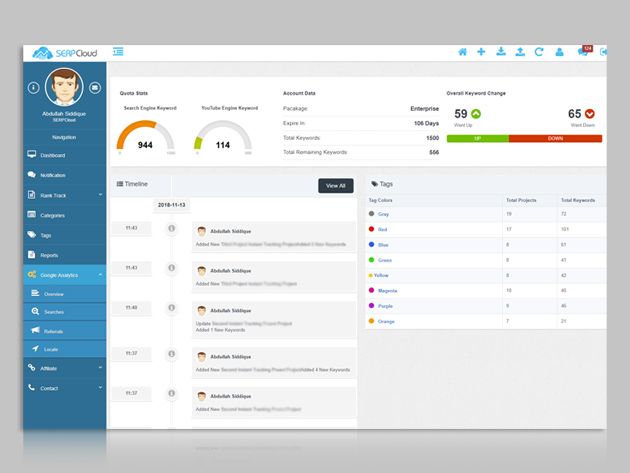
While social media makes all the noise, SEO is still the best way to get noticed online. However, keeping track of your ranking can be a time-consuming task. Enter SerpCloud — an online platform that creates detailed daily SEO reports for your site and helps you compare your performance against your competitors. Right now, you can get a lifetime Pro subscription for only $29.99 at MakeUseOf Deals.

SEO Insights

When we talk about SEO, we usually think about Google. But millions of people also use other search engines. SerpCloud helps you improve your ranking across all major search platforms.

In fact, the online platform tracks the performance of your site across 180 Google regions, along with Yahoo, Bing and Yandex. SerpCloud automatically checks these rankings every day, and you can choose to receive your results in a daily email.

But that’s not all. SerpCloud can help you analyze traffic from backlinks, social media, Alexa, YouTube, and a variety of other sources. All the data is displayed in neat charts, meaning you can see your progress.

Aside from personal projects, SerpCloud Pro is great for marketing professionals. You can easily track multiple client sites, and the app can produce white label reports. Add in Google Analytics integration and good support, and you have the ultimate SEO tool.

Lifetime Analytics for $29.99

It’s worth $2,575, but you can currently get a lifetime SerpCloud Pro subscription for only $29.99.

Want your products featured by MakeUseOf Deals? Learn more about how to sell your products online!

Read the full article: Get Detailed SEO Insights with SerpCloud Pro for $29.99

5 Little-Known Free Online Image Editing Tools to Replace Photoshop

Photoshop Alternatives

Adobe Photoshop is the king of image editors, but it costs a pretty penny. But don’t worry, you can get most of its best features for free through a few online tools.

No, we aren’t talking about the usual popular cloud-based photo editors like Pixlr, PicMonkey, SumoPaint, and others. These are relatively little-known image editors that make it easy for anyone to apply basic effects on their photos.

Naturally, none of these apps are going to be as powerful and full-featured as Photoshop itself. Adobe has hundreds of engineers working on a single product, while these online apps are usually labors of love.

Photopea (Web): The Best Free Online Photoshop Alternative

Photopea is the best online free photoshop alternative

There is no debate about this. Forget about Pixlr, forget about SumoPaint, forget about anything else you’ve tried. Once you use Photopea, you can’t go back. It’s as close to the Photoshop experience as you’re going to get.

The web app looks and feels like Photoshop, so you’ll get used to it instantly. There are detailed tutorials available for it so that you can learn how to use any feature. All the popular Photoshop features are available, like clone stamp, layers, filters, and so on. You can even open a PSD file or save an image as PSD.

Photopea’s best part is that it does all its computation offline, so your pictures are never sent to the cloud. Open the website and that’s it, the rest of the work is happening on your computer. That not only makes it faster than working online but also protects your data.

Photopea has been around for some time, but never really got its due. After recently getting some great updates, it has been gaining some popularity. Hop on this bandwagon now. Chromebook users should especially give this one a whirl.

Mara.Photos (Web): Swiss Army Knife of Tools and Effects

Mara Photos has a host of free image editing tools online

Mara slipped under most people’s radar when it launched, but it’s a brilliant and simple image editing app. It has a whole bunch of effects, filters, and tools, all of which can be applied to an image for free.

First, you need to select the effect you want to apply. Options include Resize, Crop, Rotate, Type, Sketchpad, Pop, Vintage, Art, Frame, Overlay, Stickers, Converter, Auto Fix, Red Eye, Color Picker/Converter, Dropper, Brightness/Contrast, Hue/Saturation, Vibrance, Curves, Blur, Sharpen, Smooth, Noise, Grayscale (Black & White), Threshold, Vignette, Pixelate, Mosaic, Straighten, Skew, Perspective, Twirl, Bulge/Pinch, Wave, Splitter, Color Tint, Bump, Invert Colors, Palette Extractor, Optimize Palette, GIF Editor, APNG/AWebP Editor, Mirror, Kaleidoscope, ASCII Art, 3D Anaglyph, Glitcher, RAW, EXIF, PNG Metadata, Steganography, ANSI Art, Vector Graphics Editor.

You can then upload the image from your desktop, cloud drive, or share a URL. Each effect has multiple tweaks you can make, choosing how deeply to apply the effect. And yes, once you apply an effect, you can transfer the image to another tool or effect.

Remove BG (Web): Automatically Remove Backgrounds of Photos

Remove.BG lets you automatically remove backgrounds of photos in one click

Remove BG is almost magical. In Adobe Photoshop, the magic wand tool lets you select the main subject of an image and then remove the background in the picture. Well, Remove BG is the free tool to do that online.

You have to try it out to see how well it works. Upload a picture from your computer or paste a URL. Remove BG will work on it for a few minutes and then you’ll get a result of the before and after version of the picture. You can download and save it to your computer for free, without any watermark. It’s fantastic.

Remove BG is by far the best online tool we’ve seen for this feature. Others don’t offer the same accuracy or make you pay to remove watermarks. Bookmark this one, you’ll need it.

Image Toolbox (Web): Easy Batch Image Resizing and Converting

Image Toolbox lets you batch resize images and convert them

Photoshop’s scripts make it easy to resize a batch of images quickly. If you want to do that online, Image Toolbox has your back.

The web app lets you resize a bunch of images at the same time. You can resize them based on specific resolutions for width or height, or by percentage of the original picture.

At the same time, Image Toolbox can also convert all images to JPEG or PNG, depending on what you want. As always, you can choose the quality of the JPEG or PNG file, which determines the file size too.

One nice feature is that you don’t need to re-upload the pictures if you don’t get it right the first time. There’s an option to “Re-edit and retry”, which saves you the time and energy of uploading a huge number of images a second time to get it right.

Promo Social Media Image Resizer (Web): Every Social Size, All at Once

Slidely's Promo online social image resizer

This isn’t technically a Photoshop feature, but Photoshop scripts do make it easy to convert one image into several different sizes for different social media uses in one click. Now you can do that online with Promo’s handy tool.

It’s surprisingly easy to use. First, upload a picture or add it from a URL. Then scroll down to select the types of image sizes you want. Promo has templates for everything you’d need in Facebook, Twitter, Instagram, YouTube, Pinterest, LinkedIn, Snapchat, Email and Blog, and Google Display Network. These include every type of profile picture, cover image, story, and other space where you can upload the image.

The downloaded package of zipped files has the image type in the file name, so it’s easy to know what to upload where. It’s a fantastic tool that makes life much easier.

One-Click Tools for Easier Image Editing

The multitude of options and features in Photoshop isn’t for everyone. Many people need something simpler. Just like Remove BG and Promo offer a single-click option to do one task well, there are several other one-click websites to make your photos look better.

Read the full article: 5 Little-Known Free Online Image Editing Tools to Replace Photoshop

Top news of 2018: Q4

Premium prices should come with premium quality. There are always issues with large scales mass production though and the Huawei Mate 20 Pro was the latest to experience it - its screen had a green glow seen in the dark. That wasn't the company's biggest headache this year, however, as the USA pushed its allies to drop its products. When the Xiaomi Redmi Note 6 Pro arrived at the office readers were eager to see it unboxed and reviewed. The launch of the Mi Mix 3 was Xiaomi's other win in Q4 in terms of most-read articles. However, Samsung dominated the field, creating a ton of buzz...

GSMArena.com - Latest articles

Top news of 2018: Q4

Premium prices should come with premium quality. There are always issues with large scales mass production though and the Huawei Mate 20 Pro was the latest to experience it - its screen had a green glow seen in the dark. That wasn't the company's biggest headache this year, however, as the USA pushed its allies to drop its products. When the Xiaomi Redmi Note 6 Pro arrived at the office readers were eager to see it unboxed and reviewed. The launch of the Mi Mix 3 was Xiaomi's other win in Q4 in terms of most-read articles. However, Samsung dominated the field, creating a ton of buzz...

GSMArena.com - Latest articles